
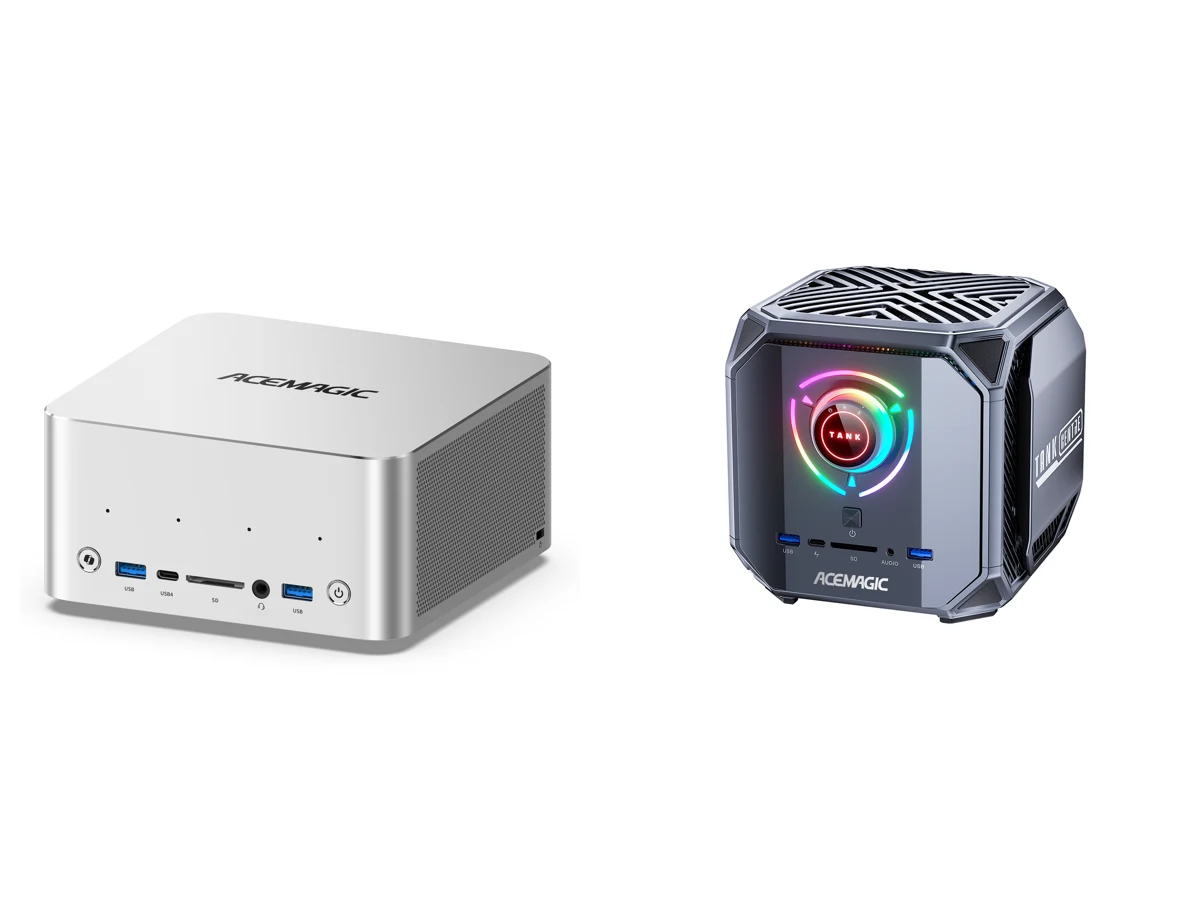
Acemagic sells two mini PCs that look like the same product on a spec sheet. The F9A and the M1A PRO+ both use AMD’s Ryzen AI Max+ 395, both have Radeon 8060S graphics, and both come with 128GB of soldered memory. They cost almost the same. The differences are in the case, the ports and the cooling, and they decide which one fits you.
We have not tested either unit. The comparison below uses Acemagic’s store listings, ServeTheHome’s review of the M1A PRO+ and press coverage of the F9A.
The short answer
- Buy the F9A if you want the smaller machine, a built-in OCuLink port for a desktop graphics card, or two USB4 ports.
- Buy the M1A PRO+ if you want three SSD slots, a physical dial to make it quieter, or the lowest price by bringing your own SSD.
Acemagic F9A vs M1A PRO+: specs side by side
| Acemagic F9A (395) | Acemagic M1A PRO+ | |
|---|---|---|
| Processor | Ryzen AI Max+ 395, 16 cores / 32 threads | Same |
| Graphics | Radeon 8060S | Same |
| Memory | 128GB LPDDR5X-8000, soldered | Same |
| Size | 158.5 x 158.5 x 81.5 mm, about 2 liters | 166.7 x 166.9 x 160.9 mm, about 4.5 liters, 2.0 kg |
| SSD slots | 2x M.2 2280 PCIe 4.0 (up to 8TB) | 3x M.2 2280 PCIe 4.0 (up to 12TB) |
| OCuLink | Built-in port, PCIe 4.0 x4 | No port. Possible with an M.2 to OCuLink adapter in one SSD slot |
| USB4 (40Gbps) | 2 | 1 |
| USB-A | 3x 10Gbps | 2x 10Gbps + 4x 5Gbps |
| Video | HDMI 2.1, DisplayPort 2.1, 2x USB4 | 2x HDMI 2.1, DisplayPort, 1x USB4 |
| Displays | Up to four | Up to four |
| Network | 2x 2.5GbE, Wi-Fi 7, Bluetooth 5.4 | Same |
| SD card reader | Yes | Yes |
| Power modes | Not published | Front dial: 70 W, 100 W, 140 W |
| Extras | Copilot button, four microphones, two 2 W speakers, light ring | RGB lighting, tool-free storage covers |
| Power supply | Not confirmed | 300 W external |
| Price (US store, Nov 16, 2026) | $3,299 | $3,399 with 2TB, $2,999 without SSD |
The size and port list for the M1A PRO+ come from ServeTheHome’s review unit. Acemagic’s own page is inconsistent on that model: one line lists HDMI 2.0 and DisplayPort 1.4, while its spec table says HDMI 2.1. ServeTheHome lists two HDMI 2.1 ports and DisplayPort 2.0, which is what we use here.
What actually differs
Size. The F9A takes less than half the volume. It is a flat aluminum box that can go behind a monitor on a VESA mount. The M1A PRO+ is a 16.7 cm cube that sits on the desk and is meant to be seen.
OCuLink. Only the F9A has the port built in. OCuLink connects a desktop graphics card at PCIe 4.0 x4 speed, which matters if you need an Nvidia card for CUDA software or want more gaming performance later.
The M1A PRO+ is not locked out. Its three M.2 slots are PCIe 4.0 x4, the same link OCuLink uses, so an M.2 to OCuLink adapter in one of them gives the same connection. The trade-offs: you give up one SSD slot (two remain), the cable has to come out through the storage bay, and it cannot be plugged in while the PC is running. We have not tested this on the M1A PRO+. Our eGPU adapter guide covers the adapters and docks, including a $20 M.2 to OCuLink adapter. So the real difference is convenience: a port on the back of the F9A against an adapter and an open bay on the M1A PRO+.
Storage. The M1A PRO+ has three M.2 slots behind two covers that open without tools. The F9A has two slots. If you keep many large model files or video projects on the machine, the third slot is useful.
Power control. The M1A PRO+ has a dial on the front that switches between 70 W, 100 W and 140 W while the PC is running. ServeTheHome measured about 43 dBA and 163 W at the wall in the 140 W mode, and 36 to 38 dBA and 87 W in the 70 W mode. Acemagic has not published power limits or noise figures for the F9A, and we found no independent measurements of it.
Meeting hardware. The F9A has four microphones, two small speakers and a Copilot button. The M1A PRO+ has none of these.
Why Acemagic sells two models with the same chip
Acemagic has not explained this publicly, as far as we could find. What follows is our reading of the lineup.
The M1A PRO+ was the fast way to market. Acemagic’s store listing for it dates from late December 2025. ServeTheHome notes that the case is reused from Acemagic’s older Tank 03 gaming mini PC, as part of a “Tank Centre” family. The same case is also sold with an Intel Core i9-13900HK and an RTX 5060 for $1,499. Reusing a case with cooling built for a gaming GPU let Acemagic ship a Strix Halo machine without designing a new one.
The F9A is the newer, purpose-built design. It was announced at the end of July 2026 and opened for pre-sale in September. Its case is shared with the F9A PRO 495, the 192GB version that costs $6,699. The F9A adds the things AI buyers asked for in this class: a built-in OCuLink port, a second USB4 port and a smaller footprint.
They aim at different desks. The M1A PRO+ is styled for gamers and people who want storage inside the box. The F9A is styled for an office or a developer’s desk.
The awkward part is the price. At $3,299 and $3,399, the two are not a cheaper and a more expensive option. They overlap almost completely. We do not know whether Acemagic plans to keep both on sale. Selling the older design until stock runs out is a common pattern, but nothing from the company confirms it.
Price and availability
Prices on Acemagic’s US store on November 16, 2026:
- F9A (395): $3,299, against a list price of $3,899. One configuration. Acemagic’s EU store names it as 128GB with a 2TB SSD and marks it as a pre-order for late November, at €3,499.
- M1A PRO+ with 2TB SSD: $3,399, against a list price of $3,699.
- M1A PRO+ without SSD: $2,999, against a list price of $3,299.
When we wrote about the F9A in September, the M1A PRO+ was listed at $2,699 to $3,099. It now costs $300 more, in line with the memory price increases that have hit every 128GB machine this year.
Acemagic’s store states a two-year warranty for products bought there.
What you can do with AI on them
Both machines hold the same models. With 128GB of unified memory, up to 96GB can be assigned to the graphics, according to Acemagic. That is enough for language models of around 70 billion parameters in quantized form, as a rule of thumb, and for larger mixture-of-experts models. ServeTheHome ran GPT-OSS-120B on the M1A PRO+.
Speed should be close on both, because the chip and the memory are the same. The power limit matters for graphics-heavy work, and only the M1A PRO+ has published limits. See our guide to NPU vs iGPU vs CPU for local LLMs for how these workloads use the hardware.
Both can take an Nvidia card later and keep the 128GB for model weights. On the F9A you plug the dock into the OCuLink port. On the M1A PRO+ you fit an M.2 to OCuLink adapter and lose one of the three SSD slots, which still leaves as many slots as the F9A has.
Adding a graphics card: speed, docks and adapters
Both routes give the same link. OCuLink is only a connector for PCIe, so a built-in OCuLink port and an M.2 slot with an adapter both run at PCIe 4.0 x4.
| Connection | Link | Speed |
|---|---|---|
| OCuLink port (F9A) | PCIe 4.0 x4 | 64 Gbps raw, about 7.9 GB/s usable |
| M.2 NVMe slot with adapter (M1A PRO+) | PCIe 4.0 x4 | 64 Gbps raw, about 7.9 GB/s usable |
| USB4 (both) | PCIe tunneled inside 40 Gbps | At most about 32 Gbps for the card |
One caution for the M.2 route: with a poor or long cable, the link can fall back to PCIe 3.0, which halves the speed. Check the negotiated link speed after you install it.
These are open docks, not closed enclosures. Each needs a desktop graphics card and an ATX or SFX power supply, which are not included. Prices are the Amazon prices we recorded on October 7, 2026 in our eGPU adapter guide, so check today’s price.
For the F9A (OCuLink port):
- AOOSTAR EG01, $99.00. A plain OCuLink PCIe 4.0 x4 dock, the cheapest from a known brand. Check today’s price on Amazon →
- RIITOP OCuLink eGPU Dock, $129.99. The dock we covered in our RIITOP OCuLink dock review. Check today’s price on Amazon →
For the M1A PRO+ (M.2 NVMe slot):
- RIITOP M.2 NVMe to OCuLink adapter, $19.99. It turns one M.2 slot into an OCuLink port, so you can then use either dock above. Only a thin cable leaves the case. Check that the OCuLink cable is included. Check today’s price on Amazon →
- ADT-Link R43SG Gen4, $85.98. It goes from the M.2 slot straight to a full-size PCIe slot for the card, with no separate dock. See our ADT-Link R43SG review. Check today’s price on Amazon →
We have not tested these docks on either Acemagic machine.
As an Amazon Associate, minipcblogs.com earns from qualifying purchases. Prices and availability change often; the price on Amazon at the time you buy is the one that applies.
What a card on a PCIe 4.0 x4 link can do
We run this kind of setup every day on a different machine with the same chip. Our Minisforum MS-S1 Max has the same Ryzen AI Max+ 395 and 128GB, with a Radeon AI PRO R9700 linked at PCIe 4.0 x4, the same speed as the routes above. On it, a 125-billion-parameter model answers at 43 tokens per second, because the fast layers run on the card and the rest stays in the 128GB of unified memory. The method and every number are in our MS-S1 Max and R9700 case study, and in the video.
Those are our measurements on the Minisforum, where the card sits in an internal PCIe slot. The link speed is the same, so a similar result is reasonable to expect on the F9A or the M1A PRO+, but we have not measured it on them.
What to know before you buy
- The M1A PRO+ left some CPU speed unused in testing. ServeTheHome measured about 15% lower multi-core performance than the Minisforum MS-S1 Max, which runs the same chip at a higher power limit.
- Check the SSD stability fix on the M1A PRO+. ServeTheHome’s pre-production unit was unstable at full GPU load with the SSD in its default slot. Acemagic told the reviewers that production units have a board fix. We have not seen that confirmed on retail units.
- The M1A PRO+ is hard to open beyond the storage bays, per the same review.
- The F9A has no independent review yet. A 2-liter case has less room for cooling a chip that can draw well over 100 W. Until someone measures it, its noise and sustained speed are unknown.
- Memory is fixed on both. 128GB is what you keep for the life of the machine.
- Acemagic’s history. In early 2024 Acemagic shipped mini PCs with malware in the factory Windows image, as covered in our Acemagic malware report. Nothing suggests a repeat, but installing a clean copy of Windows or Linux on arrival is a sensible precaution on any machine that will hold private data.
Verdict
Choose by the case, because the insides are the same. The F9A is the better pick for most AI buyers: it is half the size, $100 cheaper than the M1A PRO+ with the same storage, and its OCuLink port is built in, where the cube needs an adapter. The risk is that nobody independent has measured its cooling yet.
The M1A PRO+ makes sense in two cases: you already own an SSD and want the $2,999 version, or you value three SSD slots and the power dial more than a small footprint. It is also the one with real test data behind it.
If neither fits, the GMKtec EVO-X2 and the Framework Desktop use the same chip with 128GB.