
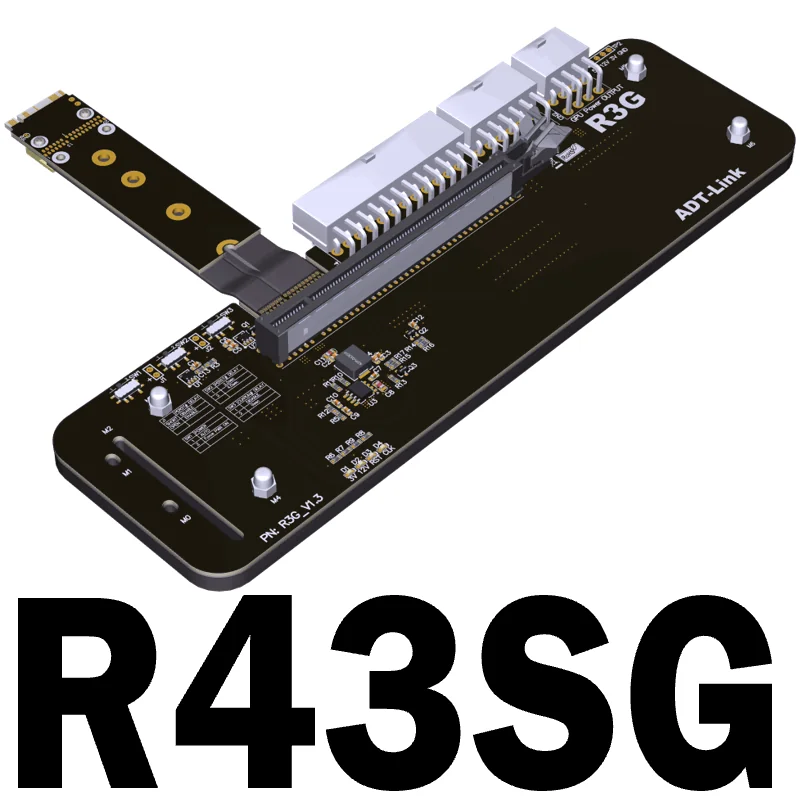
The ADT-Link R43SG is the cheapest honest way to bolt a real desktop graphics card onto a machine that was never designed to take one. It’s a small green PCB with an M.2 M-key edge connector on one end, a full-size PCIe x16 slot on the other, and a stiff shielded ribbon cable between them. Plug the M.2 plug into the NVMe slot your SSD currently occupies, drop a GPU into the x16 slot, feed the whole thing from an external power supply, and you have an external GPU for roughly the price of a mid-range case fan kit. The ADT-Link R43SG is not elegant, but for mini-PC and laptop owners hunting the lowest-cost path to an x16 card, it remains the classic enthusiast answer.
What the ADT-Link R43SG is
The R43SG is a passive M.2-NVMe-to-PCIe-x16 adapter: an eGPU “riser,” not an enclosure. There is no Thunderbolt controller, no included power brick, no aluminium shell. ADT-Link sells you the board, the flat cable, and a bracket, and trusts you to supply the rest.
Mechanically it taps the four PCIe lanes that your host routes to its primary M.2 M-key NVMe slot and re-presents them as a physical x16 slot. The card you install gets a genuine PCIe link to the CPU, just a narrow one. ADT-Link is refreshingly blunt on its own product page, stating the board is “designed for engineering test, not for home or office use.” Treat that as a temperament warning, not a dealbreaker: thousands of hobbyists run these daily.
Interface & bandwidth: how fast is PCIe 3.0 x4 really?
This is the number that decides whether the R43SG is right for you. The standard R43SG runs a PCIe 3.0 x4 link with a 32 Gbps ceiling, the same effective bandwidth as a Thunderbolt 3 eGPU enclosure, and notably more usable than TB3 in practice because there’s no Thunderbolt protocol overhead sitting between the GPU and the CPU. (ADT-Link also sells a PCIe 4.0 x4 variant that doubles the theoretical ceiling on hosts whose M.2 slot is wired for Gen 4.)
What does a x4 link cost you versus a desktop’s x16 slot? Less than newcomers expect, and more than spec-sheet optimists hope:
- GPU-bound games at 1440p/4K lose only single-digit percentages. The card is doing the work locally and barely touches the bus.
- CPU-bound or high-frame-rate 1080p scenarios lose more, sometimes 10–25%, because frames are bottlenecked on data crossing that narrow link.
- Texture streaming and asset-heavy open-world titles are the worst case, where the x4 pipe shows up as stutter rather than a lower average frame rate.
For a mini PC that otherwise has no discrete GPU at all, trading ~15% against a desktop slot to gain an RTX-class card is an easy bargain.
What GPUs and hosts it supports
ADT-Link and the community have run the R43SG with full-size cards including the Radeon Vega 64, GTX 1080 Ti, and RX 5700. High-wattage, full-length GPUs are squarely in scope. There’s no hard wattage cap on the adapter itself; your limit is whatever the external PSU can deliver and whatever the open-air slot can physically clear. Modern triple-fan RTX 40-series and RX 7000 cards work too, provided you feed them properly.
Host compatibility is the real homework. The R43SG needs a free M.2 M-key NVMe slot, and “free” usually means you have to evict your boot SSD or move it to a second slot. It does not work in B-key, A+E-key (Wi-Fi), or WWAN slots; M-key NVMe only. Good hosts include:
- Intel NUC, ITX and STX boards, which is the use case ADT-Link explicitly targets.
- Mini PCs and SFF boxes with two M.2 slots, so you can keep an OS drive while donating the second slot to graphics.
- Laptops with an accessible NVMe slot, the route the community guide videos walk through on Ryzen notebooks.
If your mini PC instead exposes a dedicated OCuLink port, you’ll get a cleaner, faster (PCIe 4.0 x4, ~63 Gbps) experience from a purpose-built dock. See our coverage of OCuLink-equipped hosts like the GMKtec K11. The R43SG is the tool for machines that have a spare M.2 slot but no OCuLink. Related: our guide to the best eGPU adapters for mini PCs, the EXP GDC Beast M.2 review, and the AOOSTAR AG02 OCuLink dock review.
Does the ADT-Link R43SG support an RTX 4090?
Physically and electrically, yes: the x16 slot and dual 8-pin power outputs will run a 4090. The caveats are bandwidth (a 4090 on PCIe 3.0 x4 leaves performance on the table in CPU-bound titles), power (you need a PSU that comfortably supplies 450W+ to the card alone), and the occasional NVIDIA Error 43 some users hit on certain laptop hosts. AMD Radeon cards tend to be the path of least resistance on these adapters.
Build, power, and cooling
The board itself is unremarkable in the best way: a sturdy x16 slot, a row of timing switches, and a flat EMI-shielded 5-conductor ribbon in your choice of 25 cm or 50 cm. The shorter cable is more reliable at PCIe 3.0/4.0 signalling; the 50 cm gives you placement freedom at the cost of a higher chance of needing to tune things down.
Two things separate “it works” from “it posts to a black screen”:
- Power is bring-your-own and mandatory. ADT-Link supports a Dell DA-2 220W 8-pin brick (the enthusiast favourite for its size) or a standard ATX/SFX PSU jumped on. The board has dual 8-pin outputs to feed the card. Live 12V pins are exposed, so respect them.
- Signal tuning is built in. SW1 picks the power-on mode, SW2 sets PERST signal delay (2.2s or 4.5s), SW3 handles CLKRUN delay, and the J1 jumper toggles the PERST function. If a GPU won’t initialise, these switches (not the GPU) are usually the fix. This is the “engineering test” personality ADT-Link warned you about.
Cooling is whatever your GPU brings; the adapter is an open-air riser, so the card sits exposed on a desk or in an open frame. Plan for dust and cable strain.
Pricing and where to buy
The R43SG sells for roughly $50–$110 depending on cable length and PCIe generation, which is a fraction of any Thunderbolt or OCuLink enclosure. On Amazon US the 25 cm kit is listed under ASIN B0CXDRLZ48, with a 50 cm variant and the older R43SG-TU also in circulation. AliExpress, ADT-Link’s home turf, often runs lower still.
Remember the true cost includes a power supply you may not already own. A used Dell DA-2 runs $15–$30; a new SFX PSU is $60+. Budget for it.
What we’d flag
The R43SG earns its low price by handing you the complexity that a sealed enclosure hides:
- No hot-plug. Power the system off, install the card, then boot. This is a sit-on-the-desk build, not a dock you tap a laptop into.
- Bring-your-own power, with live pins. The lack of an included, shrouded PSU is the single biggest friction point and the only genuine safety consideration.
- You lose your SSD slot. On single-M.2 hosts, the GPU and your boot drive are competing for the same socket, so plan storage accordingly.
- Fiddly first boot. Expect to touch the SW2/SW3 switches, try the shorter cable, and possibly wrestle NVIDIA Error 43 before it’s stable. AMD cards are friendlier.
- “Engineering test” support. ADT-Link does not pretend this is a consumer appliance, and compatibility is not guaranteed across every laptop and GPU pairing.
Verdict
The ADT-Link R43SG is exactly what it has always been: the cheapest credible way to drive a real, full-size x16 graphics card from a mini PC, NUC, or laptop that has a spare M.2 NVMe slot and no OCuLink port. If you’re comfortable supplying your own PSU, flipping a couple of timing switches, and accepting an open-air, no-hot-plug build, it delivers genuine desktop-GPU performance for a fraction of an enclosure’s price, and PCIe 3.0 x4 costs you far less real-world frame rate than the spec implies.
It is not for someone who wants a tidy, plug-and-play box. If your host has an OCuLink port, buy a proper OCuLink dock instead for more bandwidth and far less fuss. But if you have an M.2 slot, a screwdriver, and patience, the R43SG remains the enthusiast’s classic, and at $50–$110, the most card-per-dollar eGPU path there is.