
An eGPU (external graphics card) is how a palm-sized mini PC becomes a 1440p gaming PC. You put a desktop card like an RTX 4070 or RX 7800 XT in a dock, connect the dock to the mini PC, and the games run on the card. How you connect it decides how much performance you keep, and there are three ways to do it.
Prices below were checked on the Amazon product page on October 7, 2026, the last day of Prime Big Deal Days.
How each connection works
| Connection | Bandwidth | Measured loss vs. a desktop | Hot-plug | Best if… |
|---|---|---|---|---|
| OCuLink | PCIe 4.0 x4, 64Gbps (6 to 6.7 GB/s measured) | about 10% with a mid-range card; up to 23% with an RTX 4090 | No | Your mini PC has an OCuLink port |
| USB4 / Thunderbolt 4 | 40Gbps, about PCIe 3.0 x4 usable | larger than OCuLink; up to 36% with an RTX 4090 on Thunderbolt 3 | Yes | You need plug-and-play, or have no OCuLink |
| Thunderbolt 5 / USB4 v2 | 80Gbps, still PCIe 4.0 x4 at most | OCuLink is 14 to 16% faster on average | Yes | Your PC already has Thunderbolt 5 |
| M.2 NVMe adapter | whatever the M.2 slot has: PCIe 3.0 or 4.0 x4 | like OCuLink when the slot is PCIe 4.0 x4 | No | No OCuLink and no USB4, but a free M.2 slot |
Measured numbers: Notebookcheck saw an RTX 4090 lose 22.6% over OCuLink on the internal display and 16.6% on an external monitor, an RTX 4070 Ti Super lose 9.8%, and Thunderbolt 3 lose up to 36% (Notebookcheck). With an RTX 5070 Ti, OCuLink beat Thunderbolt 5 by 14 to 16% on average (Guru3D). The pattern: the faster the card, the more any eGPU link holds it back, and plugging the monitor into the graphics card instead of the mini PC always helps.
OCuLink: a PCIe cable, nothing in between
OCuLink carries the processor’s PCIe lanes straight out of the mini PC over a cable. There is no controller converting the signal, so latency is the lowest and the loss is the smallest. ChargerLAB measured 6 to 6.7 GB/s on a PCIe 4.0 x4 OCuLink dock (ChargerLAB).
The trade-offs: it is not hot-pluggable (shut everything down before connecting; turn on the dock first, then the PC), and most OCuLink docks need a separate ATX or SFX power supply for the card.
USB4 and Thunderbolt: PCIe tunneled inside USB
USB4 and Thunderbolt wrap PCIe traffic inside their own protocol (“tunneling”). The controller on each end adds overhead and latency, so you lose more performance than with OCuLink. In exchange you get hot-plug, one cable that can also charge a laptop, and compatibility with almost any modern PC that has a USB4 or Thunderbolt port. Thunderbolt 5 doubles the link to 80Gbps, but the graphics card still sees at most PCIe 4.0 x4.
M.2 NVMe adapters: borrowing an SSD slot
If your mini PC has neither OCuLink nor USB4, you can use one of its internal M.2 NVMe slots. An adapter goes into the slot where an SSD would go, and a cable carries those PCIe lanes out of the case, either straight to a graphics card riser or to an OCuLink port you can connect a dock to.
The trade-offs: you give up that SSD slot, you have to open the case and route a cable out, and it is not hot-pluggable. The slot must be M-key NVMe x4; SATA M.2 and x2 slots will not work. A PCIe 3.0 adapter halves the bandwidth to about 32Gbps, and many M.2-to-OCuLink adapters ship without the SFF-8611 cable (Evetech). Related: our EXP GDC Beast M.2 review and GLOTRENDS M2R-PCIE180 review.
Before you plug in any eGPU: enable “Above 4G Decoding” and “Resizable BAR” in the BIOS if your mini PC has them. If the card is not detected, remove other NVMe drives in case they share PCIe lanes with the port.
Quick comparison
| # | Dock or adapter | Connection | Power supply | Price (Oct 7) |
|---|---|---|---|---|
| 1 | AOOSTAR EG02 | Thunderbolt 5 + OCuLink | ATX/SFX, not included | $219.00 |
| 2 | AOOSTAR EG01 | OCuLink | ATX/SFX, not included | $99.00 |
| 3 | RIITOP OCuLink eGPU Dock | OCuLink | ATX, not included | $129.99 |
| 4 | Razer Core X V2 | Thunderbolt 5 / USB4 | ATX, not included | $349.99 |
| 5 | TREBLEET 80Gbps eGPU Enclosure | Thunderbolt 5 / USB4 v2 | 600W SFX included | $359.99 |
| 6 | Sonnet Breakaway Box 850 T5 | Thunderbolt 5 / USB4 | 850W included | $599.99 |
| 7 | ADT-Link UT3G | USB4 to PCIe 4.0 x4 | ATX, not included | $188.58 |
| 8 | ADT-Link R43SG Gen4 | M.2 NVMe to PCIe x16 slot | ATX, not included | $85.98 |
| 9 | RIITOP M.2 NVMe to OCuLink | M.2 NVMe to OCuLink port | n/a | $19.99 |
| 10 | Nimo eGPU (RX 7600M XT inside) | USB4 80Gbps + OCuLink | external, included | $699.99 |
1. AOOSTAR EG02: the best eGPU dock for most mini PCs
Why it’s good: It has both OCuLink (PCIe 4.0 x4) and two Thunderbolt 5 ports for $219.00. Use OCuLink on a mini PC that has it for the smallest performance loss, and Thunderbolt 5 or USB4 on any other machine. It takes a standard ATX or SFX power supply and mainstream NVIDIA and AMD cards.
👤 Ideal for: the buyer who does not want to bet on one connection type, or who will move the card between a mini PC and a laptop.
Keep in mind: the power supply is not included. 31 reviews averaging 4.4 stars.
Check today’s price on Amazon →
2. AOOSTAR EG01: the cheapest OCuLink dock from a known brand
Why it’s good: A plain OCuLink PCIe 4.0 x4 dock for $99.00 that takes an ATX or SFX power supply. If your mini PC has OCuLink (GMKtec K8 Plus, K11, K12, Reatan A8 and X7, AOOSTAR MACO), this is all you need besides the card and the power supply.
👤 Ideal for: the lowest-cost OCuLink setup with a power supply you already own.
Keep in mind: no Thunderbolt or USB4, and only 4 reviews so far.
Check today’s price on Amazon →
3. RIITOP OCuLink eGPU Dock: the one we tested
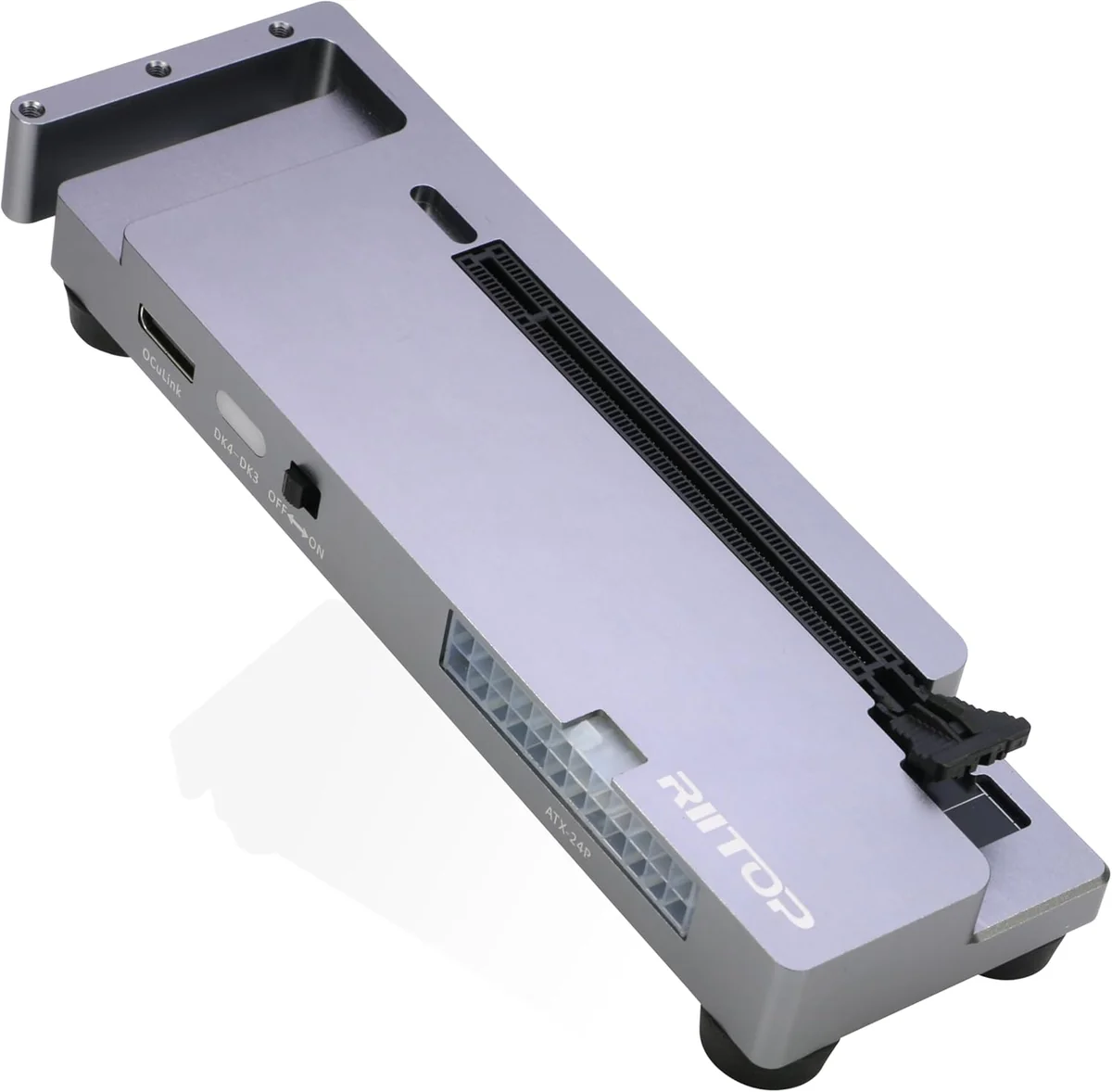
Why it’s good: An OCuLink PCIe 4.0 x4 dock for $129.99 that we cover in our RIITOP OCuLink eGPU dock review. It pairs with RIITOP’s own M.2-to-OCuLink adapter (#9) for mini PCs without an OCuLink port.
👤 Ideal for: the buyer who wants a dock and adapter from the same maker.
Keep in mind: power supply not included; Amazon showed 16 left on October 7.
Check today’s price on Amazon →
4. Razer Core X V2: the plug-and-play Thunderbolt 5 enclosure
Why it’s good: A full enclosure for cards up to 4 slots wide, with Thunderbolt 5 and USB4 compatibility, for $349.99, sold by Amazon. It is hot-pluggable and can charge a laptop.
👤 Ideal for: the mini PC or laptop owner with a USB4 or Thunderbolt port who wants a closed, finished box and no tinkering.
Keep in mind: the ATX power supply is not included, and USB4 loses more performance than OCuLink (see the table above).
Check today’s price on Amazon →
5. TREBLEET 80Gbps eGPU Enclosure: Thunderbolt 5 with the power supply included
Why it’s good: Thunderbolt 5 / USB4 v2 at 80Gbps with a built-in 600W SFX power supply and 140W charging, in an aluminum case, for $359.99. Only the card is left to buy.
👤 Ideal for: a complete Thunderbolt 5 setup at a lower total cost than #4 plus a separate power supply.
Keep in mind: 600W limits you to mid-range and upper-mid-range cards. Only 4 reviews so far.
Check today’s price on Amazon →
6. Sonnet Breakaway Box 850 T5: the premium choice for big cards
Why it’s good: Sonnet’s Thunderbolt 5 / USB4 enclosure with an 850W power supply built in, for $599.99. Sonnet has made eGPU boxes since the Thunderbolt 3 era.
👤 Ideal for: high-end cards and buyers who want an established brand’s support.
Keep in mind: it is the most expensive dock here, and it still has the Thunderbolt performance loss.
Check today’s price on Amazon →
7. ADT-Link UT3G: the bare USB4 adapter
Why it’s good: An open-frame USB4 to PCIe 4.0 x4 adapter for $188.58. No case, just the board, the slot and the cable.
👤 Ideal for: the DIY builder who will mount the card on a desk or in a custom case.
Keep in mind: no case to protect the card, power supply not included, and Amazon listed 4 to 5 days to ship.
Check today’s price on Amazon →
8. ADT-Link R43SG Gen4: an eGPU through an M.2 slot
Why it’s good: It plugs into an M.2 NVMe slot and gives you a full PCIe x16 slot at PCIe 4.0 x4 speed for $85.98. It is the classic way to add a graphics card to a mini PC with no OCuLink or USB4. Read our ADT-Link R43SG review.
👤 Ideal for: older or budget mini PCs whose only fast connection is an internal M.2 slot.
Keep in mind: you lose that SSD slot, the cable leaves the case open, and the setup is not hot-pluggable. Only 6 were left on October 7.
Check today’s price on Amazon →
9. RIITOP M.2 NVMe to OCuLink adapter: add an OCuLink port for $20
Why it’s good: For $19.99, it turns an M.2 NVMe PCIe 4.0 x4 slot into an OCuLink SFF-8611 port, so you can use any OCuLink dock from this list (#1, #2, #3).
👤 Ideal for: the cleanest M.2 route: the adapter stays inside, and only a thin OCuLink cable goes out.
Keep in mind: check whether the OCuLink cable is included before you order; many adapters ship without it.
Check today’s price on Amazon →
10. Nimo eGPU with RX 7600M XT: no card to buy
Why it’s good: The graphics card is already inside: an AMD Radeon RX 7600M XT with 8GB of GDDR6, connected over 80Gbps USB4 or OCuLink, with HDMI 2.1 and DisplayPort 2.0 outputs and 65W charging, for $699.99.
👤 Ideal for: the buyer who wants a small, quiet box with nothing to assemble.
Keep in mind: the RX 7600M XT is a 2023 laptop-class GPU; a desktop card in #1 or #2 gives more performance for the money. This listing is sold by a third-party seller and has 2 reviews. For a similar product we tested, see our GMKtec AD-GP1 review.
Check today’s price on Amazon →
How we chose
We searched Amazon on October 7, 2026 for OCuLink, USB4 and Thunderbolt eGPU docks and M.2 adapters, and opened every product page to confirm price and stock. The AOOSTAR AG02, which we liked in our review, was unavailable on Amazon on October 7, so it is not in the list. We excluded the Minisforum DEG1 and DEG2 (why).
Looking for a mini PC with OCuLink? See the 10 best gaming mini PCs from $500 to $1,000 and under $500.
As an Amazon Associate, minipcblogs.com earns from qualifying purchases. Prices and availability change often; the price on Amazon at the time of purchase is the one that applies.