
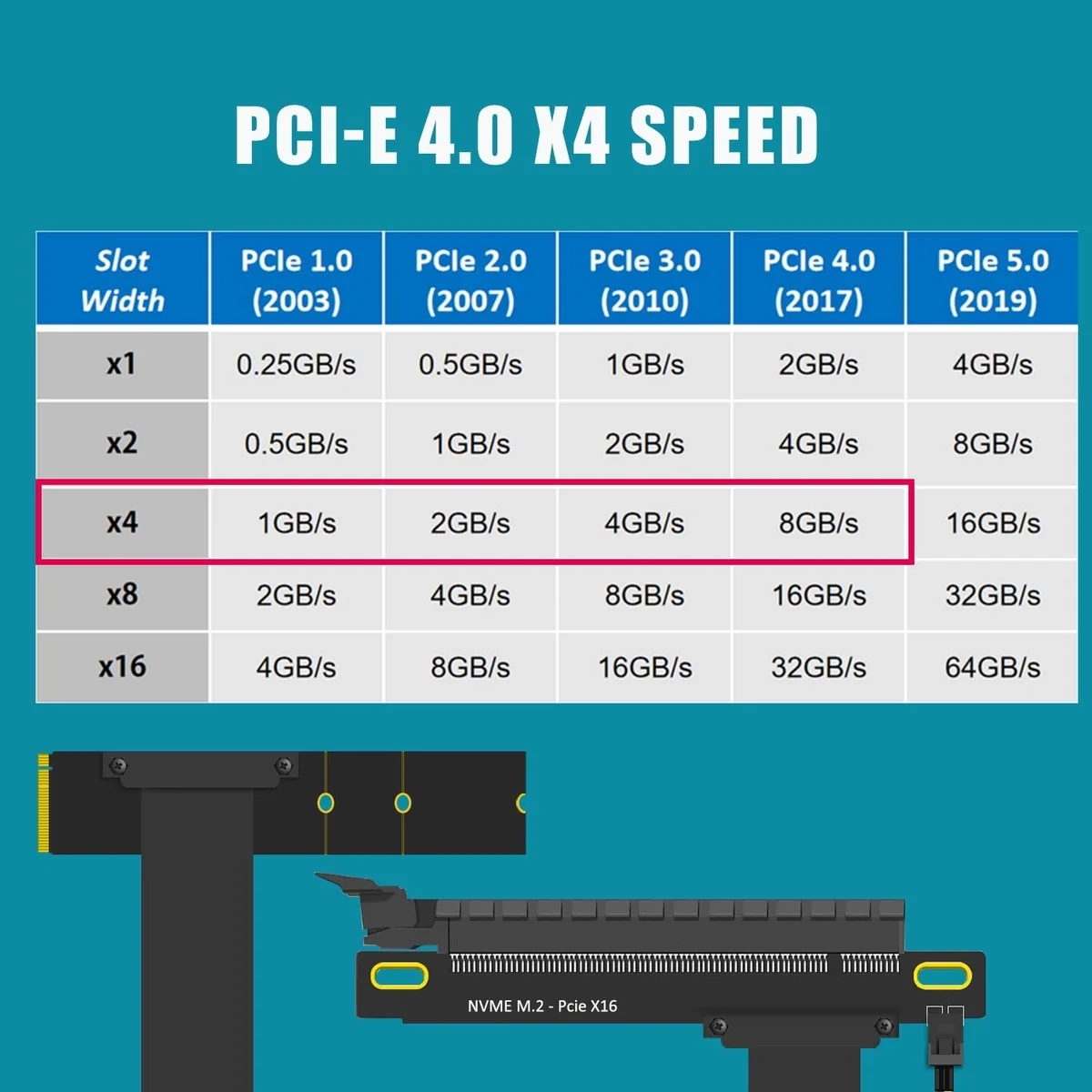
The GLOTRENDS M2R-PCIE180-300MM is not an eGPU dock. It is a bare M.2 Key M to PCIe 4.0 x16 riser cable: a 300 mm ribbon that plugs into a spare NVMe slot on one end and presents an open-ended, full-length x16 slot on the other. For roughly $50–$66, it is one of the cheapest ways to hang a desktop graphics card off a mini PC or laptop that has no OCuLink port and no spare PCIe slot. It is also the most hands-on, because everything an enclosure normally handles (power, mounting, a power button) is left to you.
This review is about what that trade actually buys you, where the M2R-PCIE180 fits, and the very real list of things you need to have in place before it works.
What it is
Physically, the M2R-PCIE180 is three parts joined by a flat shielded cable:
- A small M.2 Key M plug that seats in your NVMe slot (2280 footprint, the screw point you’d normally use for an SSD).
- A 300 mm ribbon cable.
- An open-ended PCIe x16 slot on a bracket, with an integrated 12V SATA power connector beside it.
The “180” in the model name refers to the connector orientation: the M.2 plug exits left-facing / flat (180-degree), which is what you want when the card will sit horizontally next to a small-form-factor host. GLOTRENDS sells a 90-degree sibling (M2R-PCIE90-300MM) for vertical desktop mounting: same electronics, different bend. Make sure you order the orientation that matches how your GPU will physically rest.
Critically, this is a NVMe (Key M) device only. It will not work in an M.2 SATA slot, and it is not a storage adapter; it borrows the M.2 slot purely as a PCIe pipe.
Interface & bandwidth: how much speed do you actually get?
An M.2 M-key slot is electrically PCIe x4. So the ceiling here is PCIe 4.0 x4, about 8 GB/s, and you only reach it when three things line up:
- Your CPU/platform runs the M.2 slot at PCIe 4.0.
- The M.2 slot itself is wired to the CPU at Gen 4 (chipset-hung slots are often slower).
- Your GPU is a PCIe 4.0 card.
If any link in that chain is older, you drop to PCIe 3.0 x4 (~4 GB/s). GLOTRENDS explicitly notes that Intel CPUs older than 11th generation cap at PCIe 3.0 here. On most modern AMD Ryzen and 11th-gen-or-newer Intel mini PCs you’ll get Gen 4 x4.
How much does x4 cost you versus a desktop’s x16 slot? Less than the raw numbers suggest. Independent eGPU testing has long shown PCIe 4.0 x4 (≈8 GB/s) lands within a few percent of full x16 at 1440p/4K for most single-GPU gaming, because frame rendering isn’t bus-bandwidth-bound once the assets are resident in VRAM. You lose more at 1080p (CPU- and bus-sensitive) and in workloads that stream data constantly. In bandwidth terms an M.2 x4 link is broadly comparable to OCuLink (~63 Gbps PCIe 4.0 x4) and noticeably ahead of a Thunderbolt 3 eGPU, which is exactly the framing the generic install videos above use.
What GPUs and hosts does the M2R-PCIE180 support?
GPUs: GLOTRENDS lists it as compatible with all full-size x16 graphics cards and PCIe add-in cards. The slot is open-ended, so length is not a constraint. The real constraint is power (see below): the riser passes only 75 W through its own connector.
Hosts: this is the part that decides whether it works for you. The M2R-PCIE180 needs two things from the host at the same time:
- A spare M.2 Key M (NVMe) slot you can dedicate to the GPU.
- A 12V SATA power source you can reach with a SATA power lead.
That combination is common on mini PCs and small desktops that have an internal SATA power header or a 2.5”/3.5” drive bay, and far less common on thin laptops, which is the quiet catch in GLOTRENDS’ own “add an eGPU to a laptop” marketing: a laptop with no internal SATA power can’t feed the slot. If you’re shopping a host specifically for this, mini PCs with an exposed M.2 slot and an internal SATA lead are the sweet spot.
For most readers, an OCuLink-equipped mini PC paired with a proper eGPU dock is the cleaner path: it’s plug-in, externally powered, and purpose-built. The M2R-PCIE180 is the budget alternative for hosts that only expose an M.2 slot. It competes most directly with the ADT-Link R43SG M.2 eGPU adapter, which solves the same problem with a similar cable-plus-power approach. Related: our guide to the best eGPU adapters for mini PCs, the EXP GDC Beast M.2 dock review and the RIITOP OCuLink eGPU dock review.
GLOTRENDS M2R-PCIE180 vs an OCuLink dock: which should I buy?
- Buy the M.2 riser if your host has no OCuLink port but does have a free NVMe slot and an internal SATA power lead, and you want the cheapest possible route to a full-size GPU.
- Buy an OCuLink dock if your mini PC has an OCuLink port (many recent GMKtec and AOOSTAR boxes do). You get external power, easier cable management, and hot-plug behavior the bare riser can’t match.
Build, power, and cooling
Be clear-eyed about what’s in the box: a cable, a slot, and a SATA power port. There is no enclosure, no power button, no fan, no external PSU. That has consequences:
- You bring the power. The 12V SATA port delivers the 75 W a PCIe slot is rated for. Any GPU above that (which is virtually every gaming card) needs its own ATX or SFX power supply feeding the card’s PCIe power connectors. In practice most builds use a separate ATX PSU with a paperclip/jumper or an add-on power switch to run the GPU, plus the SATA lead from the host (or the same PSU) for slot power.
- Live 12V pins. As with any open riser, treat the exposed slot and power connectors as live. Seat the card fully and don’t hot-swap.
- No hot-plug guarantees. This is an internal-slot extension, not a Thunderbolt/OCuLink hot-plug interface. Plan to connect everything with the host powered off, then boot.
- Cooling is the GPU’s own. The riser adds nothing and blocks nothing; airflow is whatever your open-air placement allows.
GLOTRENDS’ own troubleshooting note is telling: if you get crashes or a blue screen after install, re-seat the M.2 plug, recheck every connection, and reinstall the GPU driver. That is the normal eGPU-via-riser experience. It works well once stable, but first boot can take patience, and NVIDIA cards occasionally throw Error 43 on some hosts until drivers settle.
Pricing and where to buy
The M2R-PCIE180-300MM sells on Amazon (ASIN B0D45ZC6SQ) for roughly $50–$66, with the 90-degree desktop variant (B0D45QQ9JT) listed alongside it. At that price it is a fraction of a powered OCuLink dock, which is the whole point, but remember the true cost includes a PSU for any real GPU. If you already have a spare ATX power supply on the shelf, the riser is genuinely cheap. If you have to buy one, the gap to a self-powered dock narrows fast.
What we’d flag
- It’s a bare cable, not a dock. No enclosure, no power button, no included PSU: this is a parts-bin project, not a plug-and-play product.
- The 12V SATA requirement limits laptop use. Despite the “eGPU for a laptop” framing, you need a host that can supply 12V SATA power. Many laptops can’t.
- Bandwidth is x4, not x16, and it silently halves on pre-11th-gen Intel and Gen 3 platforms. Fine for gaming, more noticeable in data-heavy compute.
- Open, live 12V slot demands care during assembly and rules out casual hot-swapping.
- You occupy an NVMe slot to do it. On a single-slot mini PC that may mean giving up your storage expansion.
GLOTRENDS M2R-PCIE180-300MM verdict
The GLOTRENDS M2R-PCIE180-300MM does exactly one thing and does it cheaply: it turns a spare M.2 NVMe slot into a full-size PCIe 4.0 x16 GPU slot for around $50–$66. For a tinkerer with a mini PC that has a free M.2 slot, an internal SATA power lead, and a spare ATX PSU, it’s a legitimately effective (and very inexpensive) route to desktop-GPU performance, with bandwidth comparable to OCuLink and well ahead of Thunderbolt.
But it earns its Tentative rating because it asks a lot of the user. The missing enclosure, the bring-your-own-power reality, the live slot, and the SATA-power dependency all mean this is for people who are comfortable building. Buyers who want something that simply works should look at a self-powered OCuLink eGPU dock or the ADT-Link R43SG if they’re set on the M.2 route. For the right host and the right builder, though, the M2R-PCIE180 is hard to beat on price.