
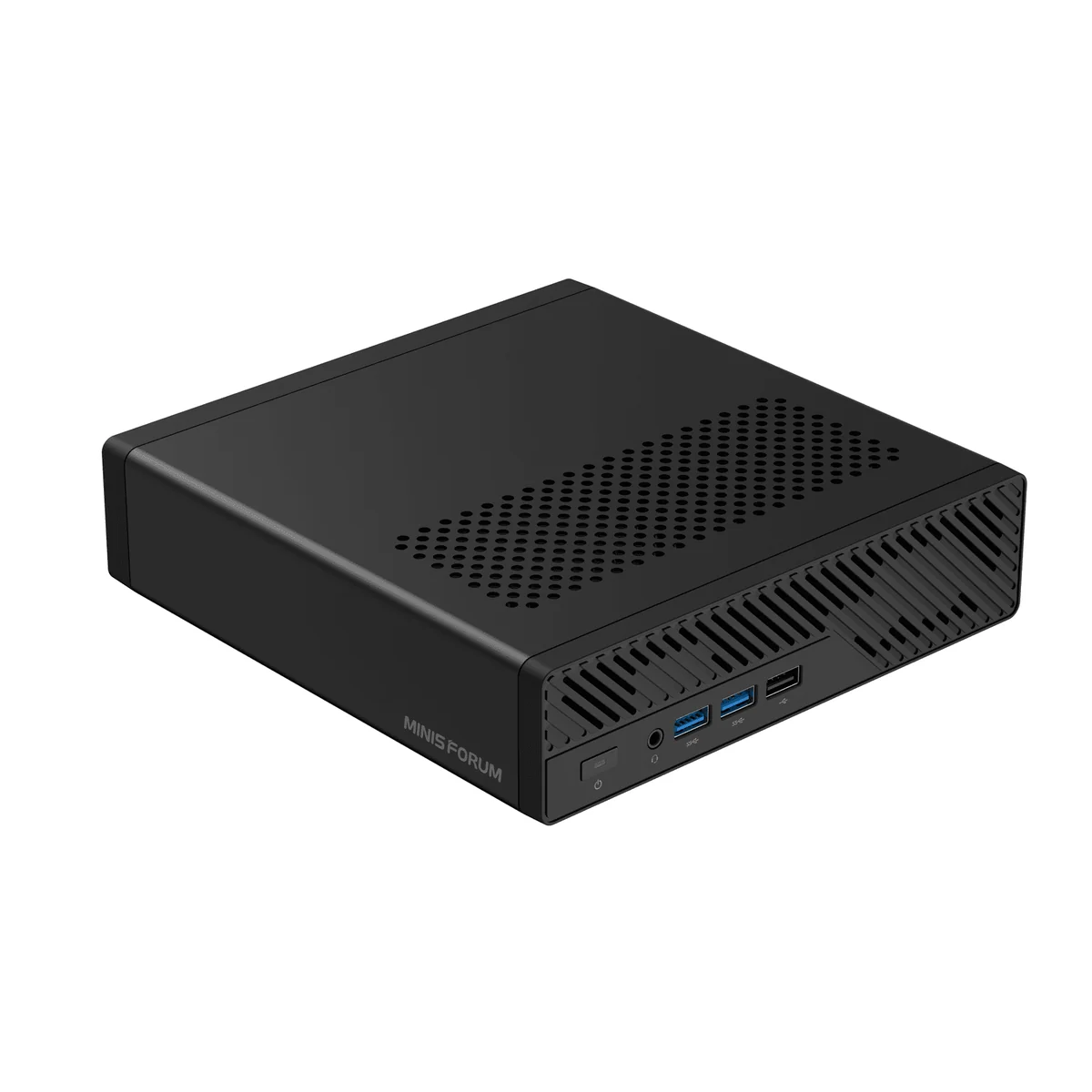
What the Minisforum MS-A2 is
The Minisforum MS-A2 is a 196 × 189 × 48 mm “mini workstation” built around AMD’s Ryzen 9 9955HX, a 16-core, 32-thread Zen 5 part borrowed from the laptop replacement segment and bolted into a small-form-factor desktop. It pairs that CPU with two Intel X710 10 GbE SFP+ ports, two 2.5 GbE RJ45 ports, three NVMe slots (one of them supporting U.2 enterprise drives up to 15 TB), and, most unusually for a mini PC, a real PCIe 4.0 x8 slot wired to a physical x16 connector, bifurcatable into 2× x4. An optional OCuLink rear-adapter accessory exposes four of those lanes as an external connector for eGPU docks like Minisforum’s own DEG1 (see our guide to eGPU adapters for mini PCs).
It is, on the spec sheet, the most server-credible mini PC Minisforum has ever shipped. It is also a Minisforum, and that matters more than the spec sheet does.
What it’s good for (on paper)
Home lab and virtualization. Sixteen Zen 5 cores, 96 GB DDR5, dual 10 GbE SFP+, and bifurcation-enabled PCIe make this one of the few sub-2-liter machines that can plausibly host a Proxmox cluster node, a Ceph OSD with U.2 enterprise NVMe, or a TrueNAS-on-bare-metal box without compromise. ServeTheHome’s review specifically framed it as an “almost perfect” homelab system on connectivity grounds.
CPU-heavy professional workloads. Cinebench R23 multi-core lands in the ~36,000–38,000 range, competitive with desktop Ryzen 9 7950X territory, and the chip will chew through compilation, virtualization, container workloads, and CAD geometry without breathing hard.
Storage density. Three NVMe slots with U.2 support and a 15 TB ceiling on the primary slot mean ~23 TB of fast tiered storage is possible in a chassis that fits behind a monitor.
Networking-bound workloads. Two real Intel X710 SFP+ ports are not a typo. For a homelab connected to a 10 GbE switch, or an NVMe-over-TCP target, this is unusual and welcome at the price.
All of that is real. None of that is the reason we cannot recommend this unit.
Build and connectivity
The chassis is a brick of perforated metal with a turbo blower stack. External port layout:
- Front: 2× USB 3.2 Gen 1 Type-A, 1× USB 2.0 Type-A, 3.5 mm combo jack
- Rear: 2× USB-C (USB 3.2 Gen 2, 10 Gbps, DP 2.0 Alt-Mode), 1× USB 3.2 Gen 2 Type-A, 1× USB 3.2 Gen 1 Type-A, 1× HDMI 2.1, 2× 10 GbE SFP+, 2× 2.5 GbE RJ45, 19 V DC input
- Optional rear: OCuLink connector via the accessory adapter card that occupies the internal PCIe slot
- Wireless: Wi-Fi 6E, Bluetooth 5.3
The internal PCIe x16 slot is physically x16 but electrically PCIe 4.0 x8 from the CPU, and accepts low-profile, single-slot cards. Bifurcation to 2× x4 is exposed in BIOS, which means a low-profile dual-port NIC, an HBA, or an NVMe carrier card all work without the usual “do not do this” disclaimers.
The cost: the PSU is not internal. Power comes from an external 19 V / 12.63 A (~240 W) brick. After the AI X1 Pro-370 shipped with an internal PSU, this feels like a step back for the price class.
Memory, storage, and upgrades
Two DDR5-5600 SO-DIMM slots, max 96 GB confirmed, no ECC. The three NVMe slots are the standout: one M.2 2280/U.2 onboard at PCIe 4.0 x4 (this is the slot that takes 15 TB enterprise U.2 drives), and two M.2 2280/22110 slots at PCIe 4.0 x4. A barebones SKU ships without RAM, SSD, or OS for users with parts on hand.
Pricing and where to buy
As of late May 2026, the US store lists the barebone MS-A2 at $439 on sale (regular $549), with pre-configured 32 GB / 1 TB at roughly $1,199 and the loaded 96 GB / 2 TB SKU at $1,919. Amazon US lists multiple configurations across the same range. VideoCardz reported the launch starting price at $799 for the barebone at announcement. That has since come down.
The 3-year factory warranty applies on both channels, in theory. See below.
What we’d flag
Measured weaknesses on this specific unit
- Audible blower noise under sustained all-core load. Multiple reviewers (NotebookCheck, Hostbor) flagged that the 9955HX’s heat output pushes the cooling stack to limits the chassis cannot mask. Quiet under desktop workloads; loud when you actually use the 16 cores. NotebookCheck’s verdict piece explicitly listed thermals and noise as the headline weakness.
- The Radeon 610M iGPU is display-output-only. Two RDNA 2 CUs are the cost of using a desktop-replacement laptop chip. Any 3D workload (even casual gaming, even modest Premiere acceleration) requires using the PCIe slot for a discrete card, which then forfeits the slot for NICs or HBAs. This is a workstation-or-homelab box, not a “do everything” box.
- External 240 W power brick. After the company’s own AI X1 Pro-370 shipped with an internal PSU, the MS-A2’s external brick is a regression for a machine that costs more.
- Only Wi-Fi 6E + Bluetooth 5.3 at a price point where Wi-Fi 7 + BT 5.4 is now standard on the company’s other 2025–2026 SKUs.
- The PCIe slot accepts low-profile, single-slot cards only. Plan GPU and HBA selection accordingly.
Brand-level concerns specific to Minisforum that this review will not paper over
The MS-A2 is, structurally, the successor to the MS-01, and the MS-01 is the SKU on which Minisforum’s worst documented post-sale failures landed. Anyone considering the MS-A2 should read these three articles first:
- The MS-01 has a documented pattern of factory thermal paste defects: owners opening units and re-pasting routinely drop temperatures 15–20 °C. The MS-A2 uses the same cooling philosophy (heatpipes + blower + tight chassis), and there is no public indication the factory process has been audited.
- The MS-01 has documented VRM-fire warranty cases: units that died with visible board damage, with warranty outcomes that varied case-by-case rather than following a single SLA.
- The MS-01 inherited Intel’s Raptor Lake (13th/14th gen) degradation pattern and Minisforum’s response was inconsistent across regions. The MS-A2 uses AMD silicon and is not exposed to that specific defect, but the behavioral pattern (how the company handled a vendor-side hardware problem) is the part that carries forward.
Related: Intel i226-V 2.5GbE instability on the MS-01 and MS-A2.
Beyond the MS-01 lineage:
- The UM790 Pro shipped dead motherboards in identifiable batches and the UM773 Lite shipped similar DOA clusters.
- The NAB9 capacitor recall was handled inconsistently across regions.
- BIOS updates have bricked units across multiple SKUs. The MS-A2’s PCIe bifurcation and U.2 support depend on BIOS firmware that the company has historically iterated on aggressively. Plan for the possibility of needing to flash, and for the recovery path not being free.
- Support response patterns across the company have been unresponsive enough to warrant their own writeup. The 3-year warranty is only as good as the company’s willingness to honor it.
- Chassis warranty denials have been contradictory across cases. EU buyers should additionally be aware of warranty depreciation fees.
None of these incidents are specific to the MS-A2. All of them are specific to the company that builds the MS-A2. A buyer choosing this unit is implicitly accepting that, if something goes wrong, the support experience may be the one documented in the articles above.
Verdict: we do not recommend
The MS-A2 is, in pure spec-sheet terms, the most interesting mini workstation of the generation. Sixteen Zen 5 cores, two real Intel X710 10 GbE ports, U.2 enterprise NVMe support, and a bifurcatable PCIe 4.0 x8 slot in a 1.8-liter chassis is a combination no other vendor currently ships at this price.
We still do not recommend buying it. Two reasons:
-
The GMKtec EVO-T1 (Arrow Lake-H, dual 10 GbE, OCuLink, three NVMe slots) sits in the same workstation-mini-PC bracket with a different vendor on the other end of the warranty email. The CPU silicon is Intel rather than AMD and the multi-thread ceiling is slightly lower than the 9955HX, but for the homelab buyer who specifically wants dual 10 GbE + OCuLink + dense NVMe, GMKtec has not accumulated the documented post-sale pattern that Minisforum has. Our review: forthcoming.
-
For buyers who genuinely need dual 10 GbE and server-grade reliability, a custom EPYC 8004-series workstation board (SP6 socket, 8–64 cores, ECC DDR5, native PCIe 5.0 lanes, IPMI, real server vendor support) will cost roughly 1.5–2× the loaded MS-A2 price and consume significantly more space, but it ships with ECC memory, real out-of-band management, and a server-vendor warranty path that does not depend on a single consumer-electronics company’s regional reseller responding to email. If the workload is “production homelab the household actually depends on,” that is the correct architecture, not a mini PC.
The premium you pay for the MS-A2 over the GMKtec alternative buys you Zen 5 cores and U.2 support (both real upgrades), but also buys you Minisforum’s post-sale support, which is the part of mini PC ownership the spec sheet does not show. The reliability tax is not theoretical. It is documented in the articles linked in the section above, and the MS-A2 inherits the MS-01’s cooling philosophy and chassis lineage directly.
The MS-A2 is a strong mini workstation. It is not a strong purchase.