
What it is
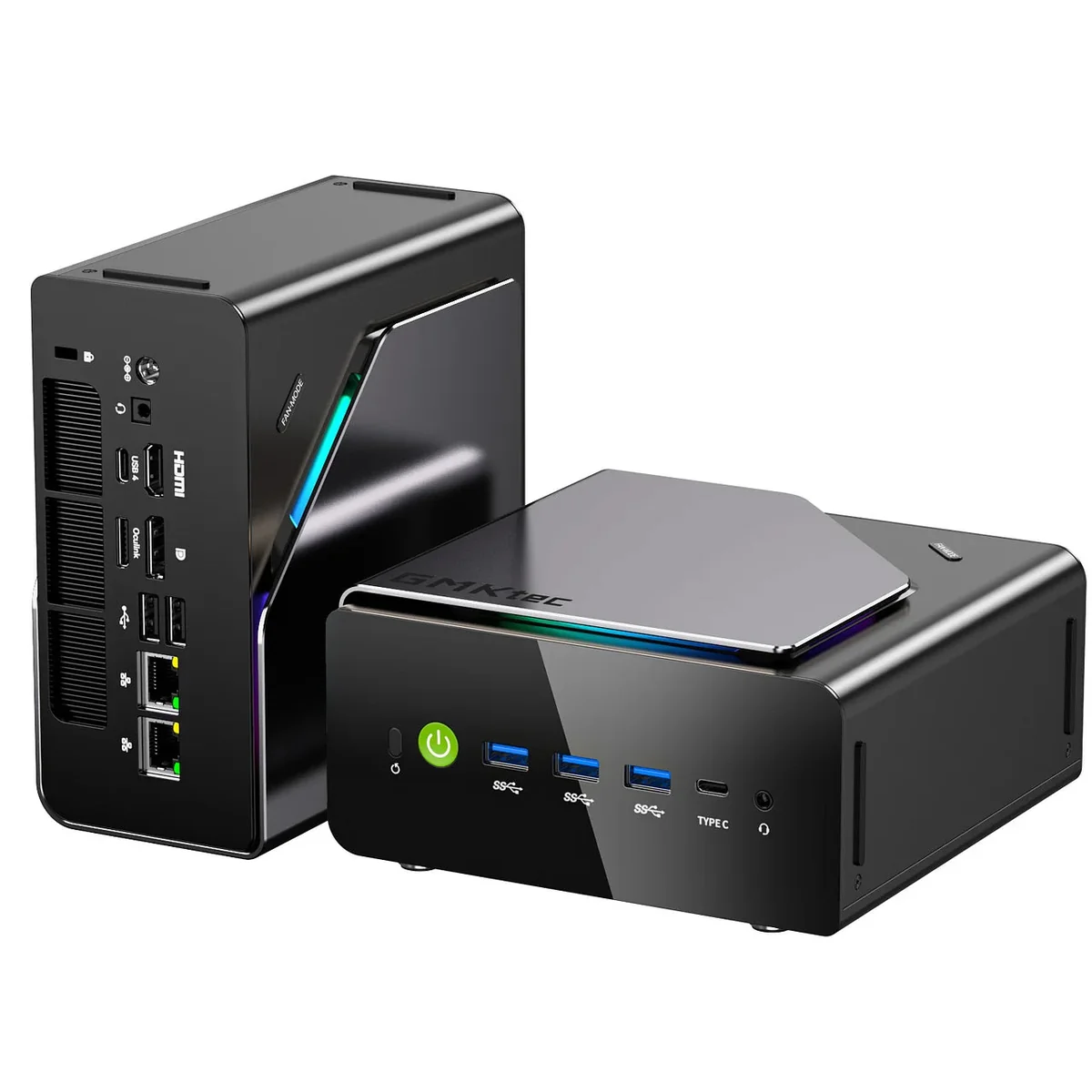
The GMKtec K15 AI (sold as the NucBox K15) is a mid-range mini PC built around Intel’s Core Ultra 5 125U: a 12-core, 14-thread Meteor Lake chip that boosts to 4.3 GHz and includes an Intel AI Boost NPU rated at roughly 11 TOPS INT8. That’s a sensible efficiency-first processor, but the CPU isn’t why this machine is interesting. The K15 stands out for its expandability: three M.2 2280 PCIe 4.0 slots, two DDR5 SO-DIMM slots good for 96 GB, and a PCIe 4.0 x4 OCuLink port for an external GPU, a combination almost nothing else offers at this price. PCWorld tapped it as a Prime Day 2026 pick at $610 (26% off), and after digging through the reviews, we understand why.
What is the GMKtec K15 AI good for?
This is a home and office workhorse first. The 125U handles browsing, Office, multi-monitor productivity, and 4K media playback without breaking a sweat, and Lon.TV found even light 4K editing in DaVinci Resolve workable: simple cuts and transitions were smooth, though heavy color grading bogs down without external graphics. The NPU adds hardware acceleration for Windows Studio Effects and light on-device AI tasks, though at ~11 TOPS it falls short of Copilot+ requirements. Temper expectations on the “AI” branding.
Where the K15 gets genuinely exciting is as a platform:
- Storage-heavy setups. Three PCIe 4.0 x4 M.2 slots support up to 24 TB, plenty for a Plex library, a lab VM datastore, or a tiered OS/scratch/archive layout most mini PCs simply can’t host.
- OCuLink eGPU host. The dedicated PCIe 4.0 x4 OCuLink port (~63 Gbps) drives a desktop GPU with far less overhead than USB4. Pair it with a dock like the GMKtec AD-GP1 OCuLink dock or the AOOSTAR AG02 and the K15 becomes a credible after-hours gaming or AI-inference box.
- Light networking duty. Dual 2.5GbE ports make it a natural fit for a router/firewall VM or a small home server.
Build and connectivity
The chassis is larger than typical for a U-series chip (154 × 151 × 73.6 mm, 910 g), and GMKtec spends that volume well. NotebookCheck notes the dual-fan, copper-heat-pipe cooler barely has to work, making the K15 exceptionally quiet under load, and the port selection beats most competing U-series boxes. You get three USB-A 3.2 Gen 2 ports and a full-function USB-C up front, plus a USB4 port, HDMI 2.1 (8K-capable), DisplayPort 1.4, two 2.5GbE jacks, and the OCuLink connector. Quad-display output works across HDMI, DP, USB4, and the front USB-C.
Wireless is Wi-Fi 6E and Bluetooth via a MediaTek MT7922 card. It’s fine in practice, though not the Intel silicon some buyers prefer, and it’s socketed if you want to swap it.
Memory, storage, and upgrades
This is the K15’s headline act. Pop the top cover and you’ll find:
- 2× DDR5-5600 SO-DIMM slots, officially up to 96 GB
- 3× M.2 2280 PCIe 4.0 x4 slots (not a 2242 afterthought among them)
- A socketed Wi-Fi card
The verified Amazon configuration ships with 32 GB of DDR5 and a 512 GB SSD, which PCWorld rightly calls rare at this price. Upgrades need nothing more than a screwdriver, and the roomy chassis means added drives don’t cook themselves. If you’ve outgrown a NUC with one SSD slot, this layout is the cure. Related: the best PCIe 4.0 NVMe SSDs for mini PCs.
Does the GMKtec K15 AI support an eGPU?
Yes, natively, over OCuLink. Unlike USB4 eGPU setups, OCuLink is a direct PCIe 4.0 x4 link with no Thunderbolt protocol overhead, so a desktop-class card retains most of its performance. One caveat from GMKtec’s own spec sheet: OCuLink is not hot-pluggable, so connect the dock before boot. Related: the best eGPU adapters for mini PCs.
Is the GMKtec K15 AI good for gaming on its own?
Not really. The integrated Intel graphics manage older and lighter titles, but Lon.TV measured Cyberpunk 2077 at 25–30 fps at 1080p lowest settings. Treat native gaming as a bonus, and plan on the OCuLink dock if games matter.
Pricing and where to buy
The Amazon listing we verified (32 GB / 512 GB, OCuLink) sells for about $610, with 32 GB/1 TB and 48 GB/1 TB configurations running up toward $820 depending on promotions. GMKtec’s own store frequently discounts the barebones unit to around $360 if you’d rather bring your own RAM and SSDs, a genuinely good route given how upgrade-friendly this machine is.
What we’d flag
No fabricated drama here (the K15 is a solid unit), but a few honest caveats:
- The CPU is the ceiling. The Core Ultra 5 125U is an efficiency chip from Intel’s Meteor Lake generation. It’s smooth for productivity, but power users doing sustained compilation, rendering, or heavy multitasking will feel its limits. A Ryzen box like the GEEKOM A8 Max offers more raw grunt.
- External power brick. Despite the roomy chassis, the PSU lives outside. NotebookCheck fairly dings this given similarly sized rivals integrate one.
- “AI” branding oversells the NPU. ~11 TOPS accelerates Studio Effects and small models; it does not make this a Copilot+ PC or a serious LLM machine. Related: NPU vs iGPU vs CPU for local LLMs on mini PCs.
- Cosmetic quirks. The top-panel “Fan-Mode” button only cycles RGB colors (it doesn’t touch fan behavior), and the Realtek NICs and MediaTek Wi-Fi are competent rather than premium.
Verdict
The GMKtec K15 AI is one of the most expandable mini PCs you can buy under $700, and it executes its brief with unusual discipline: quiet cooling, a sane port layout, easy servicing, and an upgrade path (96 GB of RAM, 24 TB of storage, a real eGPU link) that turns a modest office box into a long-term platform. The 125U keeps it out of workstation territory, but for home, office, and light AI duties with room to grow, the K15 AI earns a confident recommendation, especially at its ~$610 street price.