
What it is
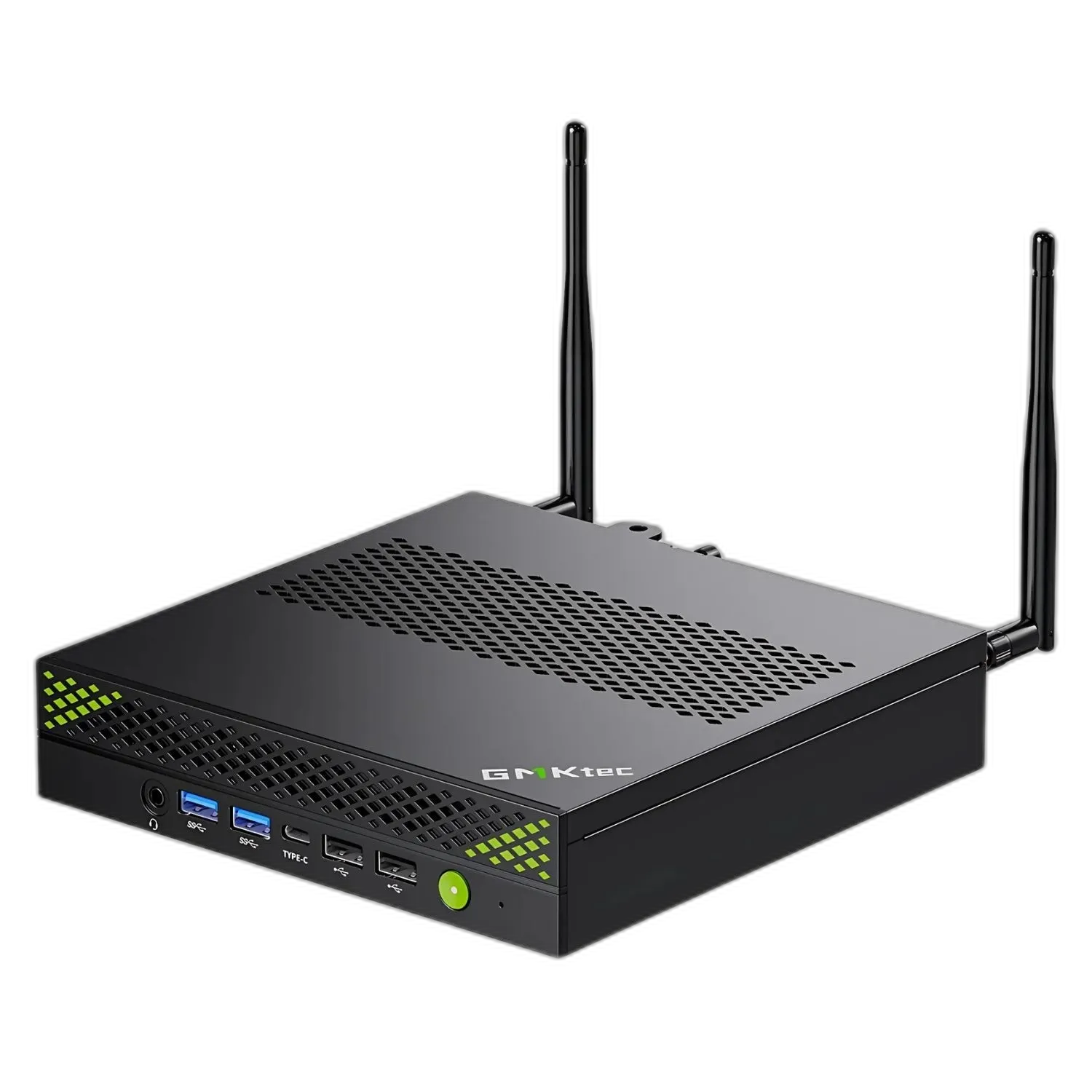
The GMKtec NucBox K10 is a workstation-class mini PC built around Intel’s Core i9-13900HK, a 14-core (6 performance + 8 efficiency), 20-thread Raptor Lake chip that turbos to 5.4 GHz. Where most mini PCs lean on a 1-liter cube, the K10 stretches into a flatter, wider chassis (188.6 × 178 × 38.9 mm) to fit three M.2 SSD slots, two SODIMM slots, and a port count more typical of a small tower than a NUC.
The K10’s pitch is clear from the spec sheet: it is built for office and small-business deployments where CPU performance, port density, and storage flexibility matter more than gaming or AI. At $569 with 32 GB / 1 TB, it is one of the cheapest ways to put a Core i9 on a desk in 2026.
What it’s good for
Office productivity and multi-tasking. The 13900HK has fourteen cores and twenty threads. For Office, Teams, twenty browser tabs, a Zoom call, a Power BI refresh in the background, and a virtual machine on the side, the K10 has more headroom than most users will ever touch.
Light to medium content work. Photo editing in Lightroom and Photoshop, 1080p Premiere editing, DaVinci Resolve for non-color-graded work, audio production: all in scope. Reviewers consistently note that the integrated Iris Xe GPU is the bottleneck for any creative workflow that wants more than 1080p timeline playback.
Multi-display office setups. Two HDMI 2.0, one DisplayPort 1.4 (8K@60), and one Type-C with DP makes four displays straightforward. For trading desks, point-of-sale, or kiosk deployments, that port count is the K10’s strongest argument.
Small-business and small-home-lab storage. Three M.2 2280 slots (supporting up to roughly 12 TB total) is unusual at this price. Plus a COM port, eight USB ports, and dual SODIMM slots for up to 64 GB of DDR5.
What the K10 is not good for: gaming. Iris Xe at 96 EUs trails the Radeon 780M significantly, and the 13900HK does not include a meaningful NPU. If gaming or on-device AI matters, this is the wrong machine; look at GMKtec’s K8 Plus or EVO series.
Build and connectivity
The K10 chassis is wider and flatter than a typical mini PC, closer in footprint to an Intel NUC Extreme than a NUC. Build is metal-shelled with plastic trim. Cooling uses a dual-fan design that stays quiet at idle and ramps audibly under sustained all-core load (the i9-13900HK is a 45-65 W chip even in mini-PC form).
Port layout is unusually dense:
- Front: Power button, USB ports, 3.5 mm jack
- Rear: 4× USB 2.0, 4× USB 3.2, 2× HDMI 2.0 (4K@60), DisplayPort 1.4 (8K@60), USB-C (data + DP), COM port, 2.5 GbE, DC jack
- Wireless: Wi-Fi 6 + Bluetooth 5.2
There is no USB4 or Thunderbolt. For a $570 workstation mini PC, the omission stings. Most competing 13th-gen i9 mini PCs at this price include at least one USB4 port. The COM port is a nice touch for industrial or POS deployments where it is still occasionally needed.
Memory, storage, and upgrades
Out of the box: 32 GB DDR5-5600 (2 × 16 GB SODIMM) and a 1 TB PCIe 4.0 NVMe SSD. Both are upgradable. The board accepts up to 64 GB of DDR5 across two SODIMM slots, and there are three M.2 2280 slots for SSD expansion: one PCIe 4.0 ×4 and two PCIe 3.0 ×4. GMKtec rates the system up to roughly 12 TB total across all slots.
For a small business that wants a single mini PC to run a database, an application server, and a backup target, the storage flexibility here is genuinely useful.
Pricing and where to buy
As of April 2026, Amazon lists the 32 GB / 1 TB Core i9-13900HK configuration in the $549-$589 range, with periodic discounts that drop it under $540. The 32 GB / 2 TB SKU sits closer to $629, and 64 GB / 2 TB lands around $729.
GMKtec’s own store sells the same SKUs at MSRP with their 1-year warranty channel. Micro Center stocks the K10 in-store at the same prices. For most readers, the Amazon listing is the practical default.
What we’d flag
This is a positive review, but a fair one: the K10 has real trade-offs.
- No USB4 or Thunderbolt. At $570 in 2026, this is the K10’s most defensible weakness. eGPU and high-end docking are off the table without a USB4 PCIe card in one of the M.2 slots.
- No NPU and weak iGPU. Iris Xe is fine for office use; for anything past that, the K10 will lose to a Ryzen 7 8845HS-based mini PC at the same price.
- Raptor Lake instability history. Intel’s 13th and 14th-gen high-power desktop SKUs had documented degradation issues in 2024-2025, addressed via microcode in late 2024. The mobile-class 13900HK has not been part of that public failure pattern, but BIOS hygiene matters more for this generation than usual; keep firmware current.
- One-year warranty. Standard GMKtec coverage, weaker than Geekom’s 3-year on comparable hardware.
- Single 2.5 GbE. Most workstation-positioned mini PCs in this price band ship with dual NICs.
GMKtec NucBox K10 verdict
The GMKtec NucBox K10 is a workstation-flavored mini PC that does one thing well: it puts a 14-core Core i9, three SSD slots, and a small-tower’s worth of ports on a desk for under $600. For office productivity, point-of-sale, kiosk, and small-business deployments where CPU and port density matter, it earns a spot on the short list.
For gaming, on-device AI, or eGPU experimentation, look elsewhere. The K10 is the right machine for a specific job, not the right machine for everyone.