
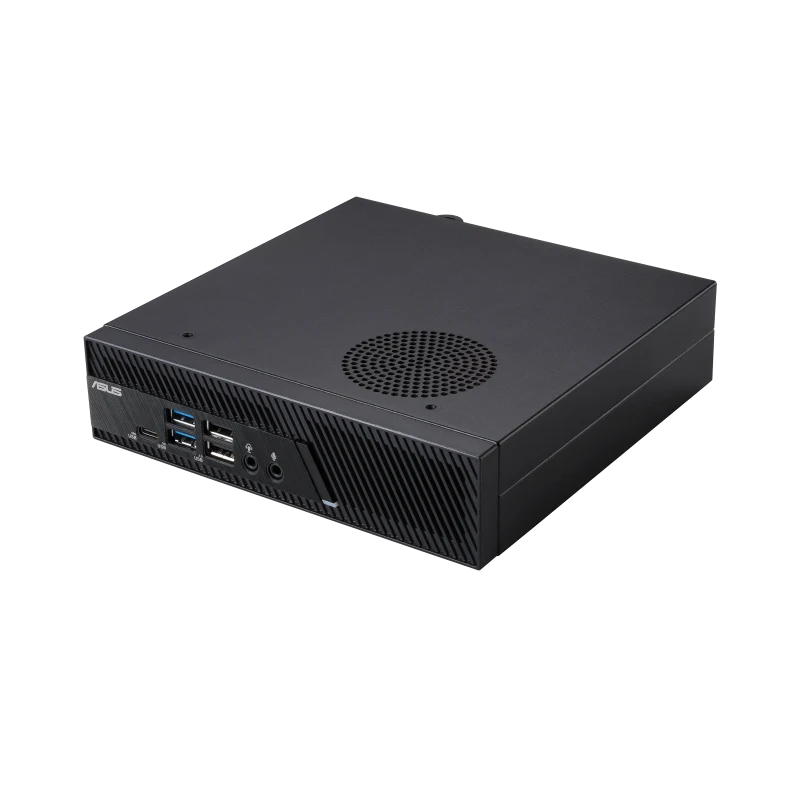
What the ASUS MiniPC PB63 is
The ASUS MiniPC PB63 (also marketed as the ExpertCenter PB63) is the rare mini PC that does not use mobile silicon. Inside the 1.35-liter chassis is a desktop-socket LGA1700 motherboard accepting Intel 12th, 13th, and 14th-generation Core processors at TDPs from 35 W up through 65 W. The top configuration is a Core i9-13900, but most retail SKUs ship with i5-14500 or i7-14700 chips.
That distinction matters. A desktop Core i7-14700 has 20 cores (8P + 12E). A mobile Core Ultra 7 155H has 16 (6P + 8E + 2LP). For sustained multi-threaded compute (compilation, rendering, virtualization), the desktop chip in the PB63 is a meaningfully different machine.
ASUS positions the PB63 squarely as a commercial product: MIL-STD-810H certified, available in black or white, VESA-mountable, with a Kensington slot and padlock-eye security.
What it’s good for
Power-user office work. The Core i7-14700 desktop chip handles software-development workloads (Visual Studio, IntelliJ, large Webpack builds), heavy Excel modeling, and Power BI dashboards faster than any mobile-class mini PC in the same price range. Igor’s Lab benchmarked the PB63 with an i5-13400 and noted “about 65 watts of package power in continuous operation,” meaning the cooler is sized to actually sustain the chip’s full TDP rather than throttling under load.
Light virtualization and home labs. Twenty-eight threads and 64 GB of DDR5 in a 1.35-liter box is a credible Proxmox or VMware ESXi node. With dual NVMe slots and a third 2.5-inch SATA bay, you can run a small lab with mirrored boot, a fast scratch drive, and bulk storage all internally.
SMB/SI deployments where the workload exceeds mobile silicon. Engineering departments running CAD lite, accounting firms running tax-season Power Query workloads, video-edit reviewers. Anywhere the previous “either get a mobile-CPU mini PC or a tower” choice was a tradeoff, the PB63 collapses it.
Commercial signage / kiosk with high-end requirements. Triple 4K output, configurable rear port (HDMI, DisplayPort, VGA, COM, LAN, 2.5 GbE), and the MIL-STD-810H environmental testing fit interactive kiosks and POS terminals in physically demanding environments.
Build and connectivity
The chassis is 175 × 175 × 44.2 mm, wider and flatter than a typical NUC, intentionally so to fit the desktop CPU cooling. Construction is matte plastic over a metal frame, with a perforated top for airflow. ASUS markets MIL-STD-810H certification: drop, vibration, temperature, altitude, humidity tested.
Front panel:
- 2 × USB 3.2 Gen 1 Type-A
- 2 × USB 2.0
- 1 × USB 3.2 Gen 1 Type-C
- Audio jacks
Rear panel:
- 1 × USB 2.0
- 2 × USB 3.2 Gen 2 Type-A
- 1 × Configurable port (order-time selection: HDMI 2.0, VGA, COM, DisplayPort, or LAN)
- 1 × 2.5 GbE Ethernet (RJ45)
- DC-in
- Padlock-eye and Kensington lock slot
Wireless is Intel Wi-Fi 6E with Bluetooth 5.2 (or 5.3 on later batches).
Eight USB ports total is generous for the form factor. The configurable port carries the same flexibility as the ASUS ExpertCenter PN64’s, and is more useful for legacy commercial integrations (POS, lab equipment, bar-code printers) than for home use.
Memory, storage, and upgrades
Two SO-DIMM slots accept up to 64 GB of DDR5-4800. Storage is the most flexible layout in any mini PC at the price: two M.2 2280 PCIe Gen4 x4 slots and a 2.5-inch SATA bay (7 mm). For mirrored boot + scratch + bulk storage, all internal, the PB63 is one of very few mini PCs that supports it.
The bottom plate releases with captive screws. SO-DIMMs and the primary M.2 are accessible without removing the cooler; the second M.2 sits underneath the SATA cage and requires a bit more disassembly. ASUS publishes a full service guide. For an IT department, this is a unit a technician can re-image, upgrade, or repair without engineering effort.
Pricing and where to buy
As of April 2026, retail pricing on Amazon:
- i3-14100 full system, 8 GB / 256 GB: around $499
- i5-14500 full system, 8 GB / 512 GB: around $599
- i7-14700 full system, 16 GB / 512 GB: around $799
- Barebone configurations roughly $150 less per tier
ASUS’ eShop and Woot.com carry the same SKUs at occasional discounts (Woot has listed the i5 system as low as $499 during clearance windows). German retailer pricing on the entry-level i3-13100 / 8 GB / 256 GB has been seen at €599.90.
Warranty is three years through ASUS’ commercial channel for the full systems.
What we’d flag
- DDR5-4800, not 5600. A generation behind the consumer NUC 14 line on memory bandwidth.
- No Thunderbolt. USB-C only, no TB4: a hard limit if you need to attach an eGPU or a Thunderbolt monitor dock.
- No Meteor Lake / no NPU. The PB63 is a Raptor Lake-family product. On-device AI features (Copilot, Studio Effects) run on CPU only.
- The fan is audible under sustained 65 W load. Igor’s Lab specifically noted the cooler is “audible but not disturbingly loud” in normal operation. For a home office, expect to hear it during compile or render.
- Plastic-heavy chassis despite the MIL-STD certification. The PB63 is built to survive vibration and thermal cycling, not to feel premium.
Verdict
The ASUS MiniPC PB63 is the answer when “mini PC with a real desktop CPU” is the actual requirement. It is the only ASUS mini PC that puts an LGA1700 Core i9 at full 65 W TDP in a 1.35-liter chassis, and the cooling is engineered to sustain that TDP rather than burst it.
It is not the most modern silicon (Meteor Lake / Core Ultra is on the NUC 14 Pro+, Arrow Lake is on the ROG NUC 2025), and it is not the prettiest mini PC ASUS makes. It is the one most likely to be the right answer when the requirement is sustained desktop performance in a tiny footprint, with a three-year commercial warranty behind it.