
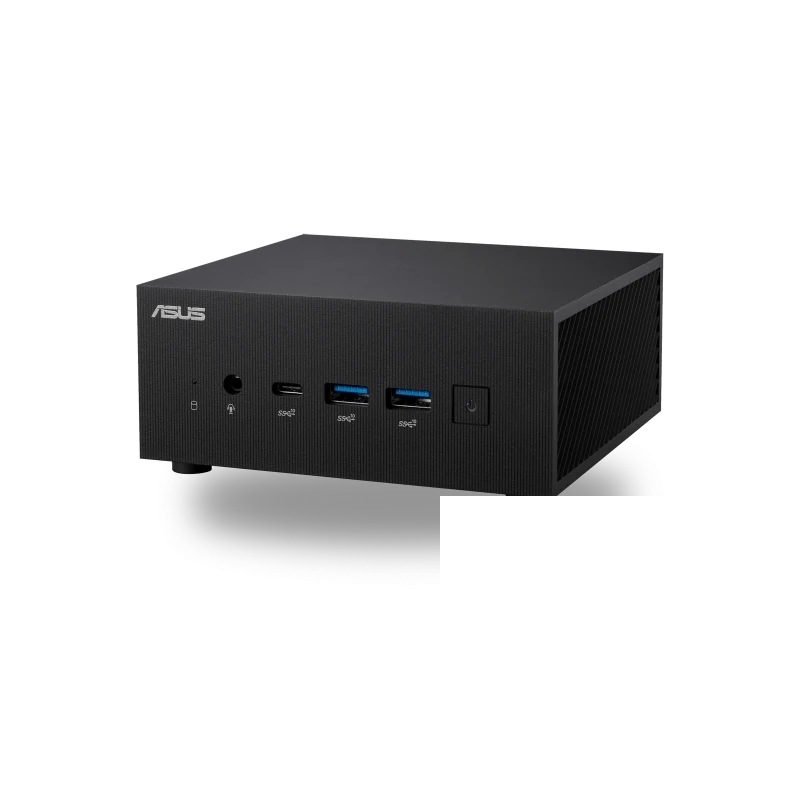
What the ASUS ExpertCenter PN64 is
The ASUS ExpertCenter PN64 is the commercial-deployment cousin of the consumer-facing NUC line: a 0.9-liter mini PC built around 12th-generation Intel Core H-series mobile silicon, with the PN64-E1 refresh quietly upgrading the same chassis to 13th-generation Raptor Lake-H. It is sold primarily to system integrators, IT departments, and SMB resellers, and the design choices reflect that audience: a black, logo-light enclosure, a configurable rear port, dual-storage layout, and a Kensington lock slot.
This is, deliberately, not an exciting mini PC. It is the one that ends up on the back of two hundred monitors in an accounting department and never gets mentioned again.
What it’s good for
Business desktop replacement. The Core i5-12500H or i7-12700H (both 14-core hybrid chips) handle the full range of office workloads without breathing hard. ASUS quotes a 23% overall performance gain over the previous PN-series generation and “over 2x” improvement on multitasking workloads, which is consistent with the jump from 11th-gen U-series to 12th-gen H-series.
Quad-display power-user setups. Two HDMI 2.1 ports, a USB-C with DisplayPort 1.4, and a configurable rear port that can be specced as a third HDMI or a DisplayPort. Stock-trading desks, monitoring rooms, and air-traffic-style multi-screen workflows are the obvious fit.
Digital signage and POS. ASUS specifically positions the PN64 for “digital signage, POS systems, and intelligent vending machines.” The configurable port (which can be ordered as a serial COM port for legacy peripherals) and the optional TPM 2.0 module are tells: this is a SKU built for fixed-function commercial deployments.
Light home-office use. For a home buyer who specifically wants the commercial warranty and the more conservative aesthetic, the i3-1220P barebone makes a perfectly credible $400 desk PC.
Build and connectivity
The chassis is matte black, plastic on top with metal sides, and the front panel is dominated by ports rather than branding. ServeTheHome’s review of the PN64-E1 specifically called out the build as “fast, energy-saving, and almost silent in normal operation.”
Front I/O:
- 1 × USB 3.2 Gen 2 Type-C
- 2 × USB 3.2 Gen 2 Type-A
- 1 × audio combo jack
Rear I/O:
- 1 × USB 3.2 Gen 2 Type-A
- 1 × USB 3.2 Gen 2 Type-C (DP 1.4 + Power Delivery input)
- 2 × HDMI 2.1 (4K@60)
- 1 × Configurable Port (order-time selection: HDMI 2.1, DisplayPort 1.4, VGA, COM, or 2.5 GbE)
- 1 × Intel 2.5 GbE RJ45
- 1 × DC-in
- 1 × Padlock ring
- 1 × Kensington lock slot
Wireless is Intel Wi-Fi 6E AX211 (or AX210 / AX201 depending on configuration) with Bluetooth 5.2.
The “configurable port” deserves special mention. For commercial buyers, it is genuinely useful: order the PN64 with a COM port for an old POS terminal, with VGA for a legacy projector, or with a second 2.5 GbE for a software-defined router build.
Memory, storage, and upgrades
Two SO-DIMM slots accept up to 64 GB of DDR5-4800. Storage is the layout that distinguishes the PN64 from the NUC 14 Pro+: one M.2 2280 PCIe Gen4 x4 slot for an NVMe boot drive, plus a 7 mm 2.5-inch SATA bay. For business deployments where bulk data still lives on a SATA SSD, the dual-storage option matters.
The bottom panel comes off with two screws and access to the SO-DIMMs and both storage bays is straightforward. Optional fTPM 2.0 or a discrete TPM 2.0 module is available for buyers who require it for compliance.
Pricing and where to buy
As of April 2026, Amazon lists the PN64 in several configurations:
- i3-1220P barebone: around $430
- i5-12500H barebone: around $499
- i5-12500H full system, 8 GB / 256 GB / Windows 11 Pro: $649
- i7-12700H full system, 16 GB / 512 GB / Windows 11 Pro: $799
The 13th-gen PN64-E1 sits roughly $50–$100 higher per tier. Volume buyers route through ASUS’ commercial reseller channel, where pricing is negotiable on quantities above ten units. Standard warranty is three years through ASUS’ commercial channel.
What we’d flag
- DDR5-4800, not 5600. The original PN64 maxes the memory bus a generation behind the NUC 14 Pro. The PN64-E1 still uses 4800-rated DIMMs. For office workloads this is invisible; for memory-bound workloads, it’s a measurable handicap.
- No Thunderbolt 4. The rear USB-C is DisplayPort + PD but not full Thunderbolt, a real limitation if you need to dock a Thunderbolt 4 monitor or attach an external GPU.
- 12th-gen and 13th-gen are now two generations behind. Meteor Lake (Core Ultra) is in the NUC 14 Pro/Pro+ instead. The PN64 is still in active production and supply, but it is not the latest-generation silicon.
- No NPU. Without a Meteor Lake AI Boost engine, on-device AI features (Windows Studio Effects, local Copilot) run on the CPU only.
- Plastic-on-top construction. Acceptable for a commercial SKU; doesn’t compete with the all-aluminum NUC 14 Pro+ on tactile feel.
Verdict
The ASUS ExpertCenter PN64 is the mini PC most likely to never appear in a “best of” roundup and most likely to be running smoothly in a back office five years from now. It is conservative, well-built, supported through a commercial warranty channel that actually answers the phone, and configurable in ways consumer SKUs aren’t.
For SMB IT, system integrators, and any deployment where the success criterion is “still working in 2031,” the PN64 is the safer choice. For home users who want the latest silicon, the NUC 14 Pro+ is the better buy in the same brand family.